
Breaking the Cycle of Reactive IT Support
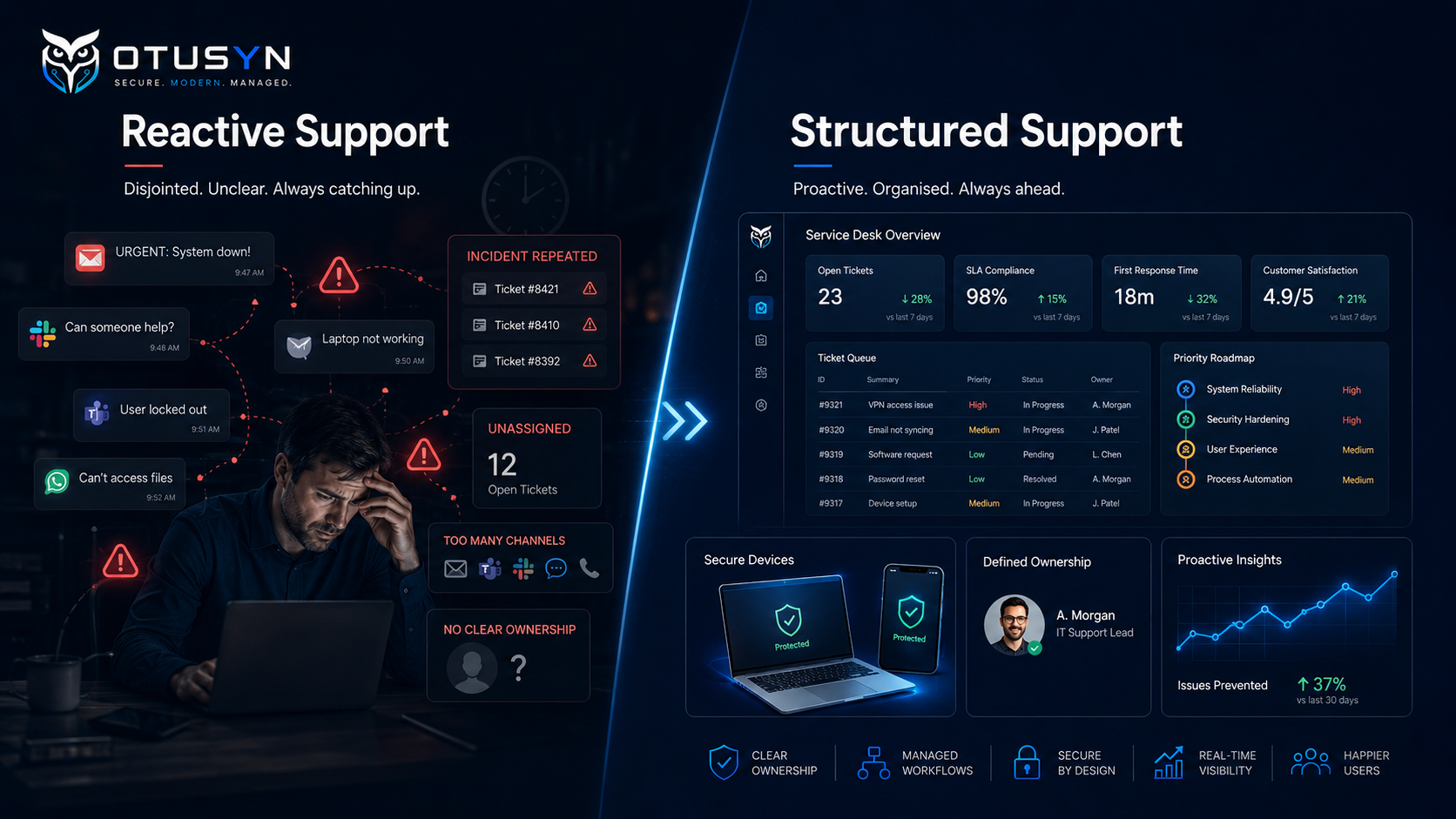
IT support can feel busy every day while progress still feels unclear.
Users are getting help. Tickets may be closed. Devices are being replaced. Accounts are being created. Suppliers are being contacted. Yet the same issues keep returning, onboarding is inconsistent, key tasks rely on individual knowledge and leadership has limited visibility of what is improving.
When this happens, the problem is not always a lack of tools or people.
It may be that the current IT support model needs review.
A practical assessment looks beyond ticket numbers. It examines how support behaves day to day, whether ownership is clear, how repeatable important processes are and whether the organisation has a realistic view of its current priorities.
The goal is not to create a complicated operating model.
It is to understand what is working, where friction is appearing and what should be stabilised first.

What is an IT support model?
An IT support model is the practical structure used to manage technology support across the organisation.
It includes more than a helpdesk or ticketing system.
A clear support model defines:
- How users request support
- How incidents are prioritised
- Who owns Microsoft 365 administration
- Who approves access requests
- How new starters are onboarded
- How are lever actions completed
- How suppliers are coordinated
- How recurring issues are identified
- How service performance is reviewed
- How improvement work is prioritised
For smaller organisations, some of these responsibilities may be shared between internal staff, external providers and business managers.
That is not necessarily a problem.
The important question is whether responsibilities are understood, documented and repeatable.
If nobody can clearly explain who owns important tasks, the organisation is likely to experience delays, inconsistent outcomes and avoidable risk.
Why assess your IT support model?
Many organisations only review IT support after a major issue.
A security incident, failed onboarding process, service outage, supplier dispute or repeated complaint can trigger a review. However, waiting for a major failure is not always necessary.
A support model assessment can help organisations identify issues earlier.
It can show whether:
- Support requests are being handled consistently
- Users know where to ask for help
- IT responsibilities are clear
- Recurring issues are being addressed properly
- Access management is controlled
- Suppliers are being managed effectively
- Documentation is reliable
- Service performance is visible
- Improvement work is moving forward
The aim is to create a practical evidence base before making large decisions about new tools, new suppliers, new hires or managed service packages.
Clarity on operations often saves budget and effort later.
What to assess first
A useful IT support assessment should begin with the operational areas that have the biggest effect on users and business continuity.
You do not need to review every system in detail on day one.
Start with the areas that show how support works in practice.
Where support requests enter
Look at how users currently ask for help.
Support may arrive through:
- Shared inboxes
- Microsoft Teams chats
- Phone calls
- Direct messages
- Personal emails
- Verbal requests
- Ticketing systems
- Managers contacting IT on behalf of staff
A mix of channels is common, especially in growing organisations.
The risk appears when there is no recognised route for support requests. In that situation, users may not know where to go, urgent issues may be missed and support teams may struggle to prioritise work.
Ask:
- Is there a clear support route for users?
- Are support requests logged consistently?
- Can urgent issues be identified quickly?
- Are requests being lost in chats or emails?
- Can leaders see support demand and recurring themes?
- Do users understand what response they can expect?
A defined support route does not have to be complicated. It may be a service desk, a shared support inbox or a structured request form.
The important point is that the organisation can see and manage the work.
How priorities are set
Not every support request has the same impact.
A user unable to access customer records may need urgent support. A request for new software may be important but not time-critical. A recurring issue affecting many users may need a deeper review rather than another temporary fix.
A clearer support model should define practical priority levels.
For example:
| Priority | Typical example | Expected response |
|---|---|---|
| Critical | Major outage affecting multiple users or key services | Immediate response and active management |
| High | An individual unable to work or a serious security concern | Fast response and clear ownership |
| Medium | Standard user issue with workaround available | Managed within normal support times |
| Low | Routine request, improvement idea or non-urgent change | Planned and prioritised appropriately |
The exact labels do not matter as much as consistency.
Users need to understand how support is prioritised. Support teams need a shared way of deciding what should be handled first. Leaders need visibility of whether urgent work is consuming most of the available capacity.
Without this, everything can start to feel urgent.
Who owns Microsoft 365 administration and access tasks?
Microsoft 365 is often at the centre of daily business operations.
Email, Teams, SharePoint, OneDrive, user accounts, security settings, shared mailboxes and access permissions may all depend on it.
A support model assessment should identify who owns the key administrative tasks.
This includes:
- User account creation
- Licence assignment
- Multi-factor authentication support
- Shared mailbox access
- Teams and SharePoint permissions
- Group membership
- Guest access
- Admin role management
- Security settings
- User offboarding
- Escalation to Microsoft or external providers
A common issue in growing organisations is that access tasks are handled informally.
A manager might send an email asking for access. A user may message someone directly. An IT person may add permissions without checking whether they are still appropriate. Temporary access may become permanent.
Over time, this creates unclear ownership and unnecessary security risk.
A practical assessment should ask:
- Who approves access?
- Who applies the access?
- Who checks whether access is still needed?
- Are shared mailboxes owned by named business users?
- Are Teams and SharePoint sites reviewed?
- Are leveraged accounts removed promptly?
- Are administrative roles limited and reviewed?
You can explore this topic further in OTUSYN’s Microsoft 365 Access Review Checklist for SMEs.
How repeat incidents are identified and reduced
Support teams often solve the same problem more than once.
A user may keep losing access to an application. A device may repeatedly fail compliance checks. A shared mailbox may require manual permission updates every month. A printer issue may affect the same office repeatedly. A supplier platform may cause recurring disruption.
Repeated incidents should be treated as a signal.
They may indicate:
- A technical configuration issue
- An incomplete process
- A weak device standard
- A supplier problem
- A training gap
- A missing support article
- A recurring user-access issue
- A deeper infrastructure concern
A good support model separates one-off incidents from recurring problems.
Ask:
- Which issues have been raised multiple times?
- Which users or teams are affected most often?
- Are recurring incidents being categorised?
- Has anyone investigated the root cause?
- Is there a clear owner for the problem?
- Has a permanent fix been planned?
- Are users receiving the same workaround repeatedly?
The goal is not to eliminate every issue.
The goal is to stop repeated support demand from becoming normal.
Whether users understand expected support routes
A support model only works if users understand how to use it.
Users should know:
- Where to request help
- What to do when something is urgent
- How to report a suspicious email
- How to request access
- How to report a lost device
- How to request a new starter setup
- Who to contact if a key service is unavailable
- What information should they provide with a support request
When these routes are unclear, users often create their own workarounds.
They may contact whoever helped them last time. They may post in the wrong chat. They may ask managers to chase IT. They may use personal storage, unapproved tools or informal sharing methods because they do not know the approved route.
A practical assessment should include short conversations with users and managers.
Ask them:
- Do you know where to ask for IT help?
- Do you know what to do if you lose access?
- Do you know how to report a suspicious email?
- Do you receive useful updates on support requests?
- Do you know who supports your devices and systems?
- Are there common IT issues that frustrate your team?
User feedback often identifies operational gaps that support data alone may not show.
Signals your IT support model needs improvement
Some warning signs are easy to recognise.
Support depends on individual availability
If support quality depends on whether one person is available, the organisation is exposed.
This may happen when key knowledge sits with an individual, documentation is limited or support responsibilities have not been shared clearly.
A stronger model should reduce dependency on specific people by documenting essential processes, assigning ownership and creating clear escalation routes.
Leaver and onboarding tasks are inconsistent
New starters may wait too long for devices, accounts or access. Leavers may retain permissions after leaving. Managers may need to chase different teams for updates.
This often means the joiner, mover and leaver process is informal or incomplete.
A simple checklist and clear ownership can make a major difference.
Known issues keep returning
If the same issues are fixed repeatedly, the organisation may be dealing with symptoms rather than causes.
Recurring problems should be logged, reviewed and assigned for deeper investigation.
Leadership cannot see service performance clearly
Leaders do not need detailed technical dashboards every day.
However, they should be able to understand:
- Support demand
- Major incidents
- Recurring issues
- Security risks
- Device health
- Outstanding improvement actions
- Supplier concerns
- Key priorities for the next period
If leadership only hears about IT when something goes wrong, the support model may not be providing enough visibility.
What should an IT support assessment produce?
A strong assessment should lead to practical priorities.
The outcome should not be a long technical report that is difficult to act on.
It should provide a clear view of:
- What needs to be stabilised now
- What should be standardised next
- Which issues need deeper remediation
- Which responsibilities need clearer ownership
- Which risks require leadership decisions
- What can be planned for later
A useful assessment output may include:
| Area | Example assessment finding | Suggested action |
|---|---|---|
| Support requests | Requests arrive through multiple informal channels | Define a single support route and priority process |
| User lifecycle | New starter and leaver tasks are inconsistent | Create and assign a joiner, mover and leaver checklist |
| Access management | Shared mailbox and Teams permissions are not regularly reviewed | Introduce regular access reviews and named owners |
| Devices | Device standards vary by team | Define endpoint baseline and managed device process |
| Recurring issues | Same access issues appear repeatedly | Log problem record and investigate root cause |
| Documentation | Support information is held by one person | Create central operational documentation |
| Leadership reporting | Priorities are unclear | Create a monthly IT support and risk summary |
This creates a bridge between assessment and action.
For some organisations, the next step may be a focused improvement plan.
For others, it may lead to an IT Current-State Assessment, structured managed IT support or a package-based service approach.
Start with evidence before changing suppliers or tools
When IT support feels difficult, it can be tempting to replace tools, add licences or change providers immediately.
Sometimes that is necessary.
However, major decisions should be based on evidence.
Before making a large tooling or supplier decision, assess:
- What the current support model is doing well
- Where users are experiencing friction
- Which issues are recurring
- Whether ownership is clear
- Whether processes are repeatable
- Whether the current provider is delivering against agreed expectations
- What the business actually needs next
This helps organisations avoid solving the wrong problem.
For example, a new ticketing tool will not fix unclear ownership. More security software will not fix inconsistent leaver actions. A new provider may not improve outcomes if the organisation has not defined its priorities or service expectations.
A current-state review provides the clarity needed to make better decisions.
A practical IT support model assessment checklist
Support process
- Users have a recognised route for requesting support
- Support requests are logged consistently
- Urgent issues can be identified quickly
- Priority levels are understood
- Support updates are communicated clearly
- Recurring incidents are visible
Ownership and access
- Microsoft 365 administration responsibilities are defined
- Access approvals have named owners
- Shared mailboxes have business owners
- Teams and SharePoint ownership is clear
- Administrator roles are reviewed
- Leaver access is removed promptly
User lifecycle
- New starter processes are documented
- Device preparation responsibilities are clear
- Access is assigned according to role
- Leaver processes are consistent
- Devices are returned and reviewed
- Licence and account actions are completed
Problem management
- Repeat incidents are identified
- Root causes are investigated
- Known issues are documented
- Permanent fixes are planned
- Support knowledge is shared
- Problem owners are assigned
Governance and reporting
- Service performance is visible to leadership
- Key risks are documented
- Improvement priorities are agreed
- Supplier ownership is clear
- Documentation is current
- Monthly reviews are in place
Frequently asked questions
How often should we assess our IT support model?
Most growing organisations benefit from a structured review at least once a year, with lighter operational reviews monthly or quarterly. A review should also take place after a major growth period, security incident, supplier change or significant technology change.
Is an IT support assessment only for businesses with an internal IT team?
No. It is equally useful for organisations using outsourced IT providers, hybrid support models or a mix of internal staff and suppliers. The assessment helps clarify responsibilities across everyone involved.
Should we change our IT provider if support feels reactive?
Not necessarily. First, assess the current model, service expectations, ownership and recurring issues. A provider change may be appropriate, but it should be based on evidence rather than frustration alone.
What is the difference between an IT support assessment and an IT Current-State Assessment?
An IT support assessment focuses mainly on service behaviour, ownership, processes and support performance. An IT Current-State Assessment is broader and may include systems, security, devices, cloud services, suppliers, documentation and technology priorities.
What should we improve first?
Start with the areas creating the most user friction or operational risk. For many organisations, this includes support request handling, onboarding and offboarding, access management, recurring incidents and device visibility.
Build a clearer support model before making bigger decisions
A busy support environment does not always mean the model is working well.
The strongest support models are built around clear ownership, practical processes, consistent priorities and visible improvement actions.
Assess how support currently behaves. Identify where users experience friction. Review whether key tasks are repeatable. Use evidence to decide what should be stabilised now and what should be improved next.
OTUSYN helps growing organisations assess their IT support model, identify operational gaps and create practical priorities for more structured support.